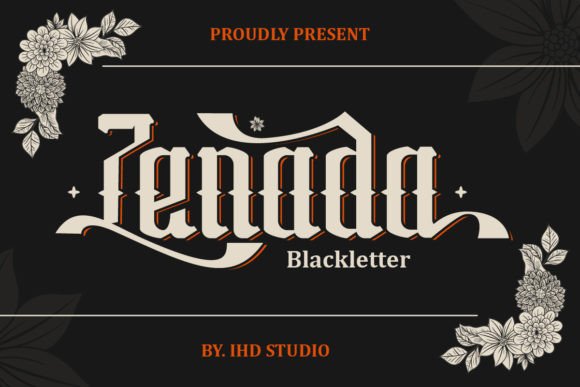
Zenada: A Blackletter Font That Adds Elegance to Handmade Designs
While preparing mockups for a new line of candle labels, I stumbled across Zenada — a blackletter font that instantly elevated my design from simple to statement-making. Its intricate, angular lines reminded me of vintage calligraphy, but with a boldness that felt modern and fresh. As a maker who frequently designs product labels, wedding invitations, and seasonal printables, I knew this font would become a staple in my creative toolkit.
Zenada for Candle Labels and Packaging Design
One of the first ways I used Zenada was on candle labels for a small batch of soy candles I was preparing for a local boutique. The ornate details of the font gave the labels a luxurious feel, perfect for my lavender and eucalyptus scent line. Because Zenada is a blackletter font, it works best for short phrases and product names rather than long descriptions, making it ideal for packaging where space is limited.
I paired Zenada with a clean sans serif font for the ingredient list and care instructions, which created a nice visual contrast and kept the design from feeling too heavy. The result? A professional, cohesive look that made my candles stand out on the shelf.
Wedding Invitations with Zenada: Timeless Elegance
When a friend asked me to design her wedding invitations, I immediately thought of Zenada. The font’s intricate style added a touch of old-world charm, perfect for a formal event. I used it for the couple’s names and event title, while a more readable serif font handled the details like date, time, and venue.
Because Zenada is a display font, it shines brightest when used sparingly and at larger sizes. On the invitations, I printed the names in gold foil, which highlighted the ornate strokes and gave the design a high-end finish. It was a joy to see how the font transformed a simple invitation into a keepsake piece.
Using Zenada in Seasonal Printables and Planner Pages
As a printable creator, I often design seasonal templates for digital planners. Zenada became my go-to font for section headers like “Fall Goals” or “Holiday Planning.” Its sharp lines and vintage flair gave the pages a unique aesthetic that stood out from more generic fonts.
When designing digital downloads, I made sure to preview the font at different sizes to ensure legibility. While Zenada isn’t ideal for body text, it works beautifully for titles and accent phrases. I also included alternate glyphs in the design files so customers could customize their headers with swashes and ligatures.
Creating Boutique Tags and Product Stickers with Zenada
For a line of handmade soaps, I needed tags that felt upscale yet personal. Zenada’s ornate design gave the tags a boutique feel, especially when printed on kraft paper with a dark ink. I used it for the product name and paired it with a minimalist font for the ingredients and scent notes.
When cutting stickers with a Cricut, I made sure to adjust the spacing slightly to avoid overlapping lines — a common issue with intricate blackletter fonts. The result was a polished, professional look that elevated the overall product presentation and helped build brand recognition.
Pairing Zenada with Other Fonts for Visual Harmony
One of the joys of working with Zenada is experimenting with font pairings. Because it’s a bold, decorative typeface, it pairs best with simpler fonts that balance its complexity. I’ve used it successfully with script fonts for a romantic touch, clean sans serifs for modern contrast, and even bold display fonts for layered designs.
In a recent line of printable wall art, I combined Zenada with a soft script for a quote layout. The contrast between the two styles created visual interest while maintaining readability. It’s a great example of how thoughtful font pairing can enhance the emotional appeal of your designs.
Designing with Zenada for Mugs, Shirts, and Tote Bags
I recently added a line of custom mugs and tote bags to my shop, and Zenada quickly became a favorite for names and short slogans. The font’s angular lines translated well to screen printing, especially when using a single color. I made sure to test print on transfer paper first to ensure the fine details remained crisp after heat pressing.
For tote bags, I used Zenada in a minimalist layout with a small border accent. It looked elegant without being overwhelming — a key consideration when designing wearable or usable items. The font’s vintage charm also made it a hit for personalized gifts like monogrammed mugs and embroidered tote bags.
Using Zenada in Digital Design and Social Media Graphics
As someone who also creates digital templates for Etsy and Creative Market, I’ve found Zenada to be a strong asset in web design and social media visuals. It adds a unique editorial design flair to Canva templates, Instagram story headers, and Pinterest quote graphics.
When using Zenada in digital formats, I recommend checking the file formats included in the font package. Most premium fonts come with web-optimized versions, which are essential for smooth rendering online. I also made sure to offer preview images that showed the font in context, helping potential buyers visualize its creative potential.
Making the Most of Zenada’s Features and Styles
Before using Zenada in commercial products, I always check the font license to ensure it allows for resale in physical and digital formats. I also explore the full character set, including ligatures, swashes, and alternate letters, which add customization options for my customers.
For printables and SVG designs, I include tips on how to access these special characters in design software like Adobe Illustrator, Silhouette Studio, and Cricut Design Space. It’s a small detail that makes a big difference in helping buyers get the most from the font.